Welcome to my next blog on “New Feature Management” for Inventory and Warehouse module. Microsoft has added 100+ new features recently in version “10.0.9” out of which we will explore three important one today. Before I come up with new blog for GST series, I thought to share something on Inventory management side.
So, let’s start, here is the list of new features which we will explore today:
- Inventory Journal Approval Workflow
- Using Unit of measure and unit quantity
- Enable to Update same GST transaction Id for both shipment and receive-India GST

- Inventory Journal Approval Workflow: This was the long pending feature from Microsoft which has been added. This feature allows us to defining the work flow for all the inventory journals e.g. Inventory adjustment, Inventory Movement, Counting etc… similar to “Finance Journals”
Earlier having the control over posting of these journals was a big challenge. Here are few scenarios where customers can utilize this:
- After stock count, journal can be submitted to finance team to have the over all impact overview and then it can be posted
- All the adjustment journal can be created by Inventory supervisor and then it can approve by inventory manager to have proper control over “Inventory “and avoid any mistake
- All inventory movement journals can be submitted for finance team to review the “Offset Account” and value associated with it
There can be many more scenarios where it can be utilized. Let’s see how to create workflow:
Pre-requisites: Dynamics 365 version 10.0.9 or above and Also assuming that user has knowledge about defining the workflow.
Step-1: Navigate to, Inventory Management > Setup > Inventory Workflow > Click New

Step-2: Select the Journal type for which workflow has to be created

Step-3: Define the approval steps and other conditions as per your requirement, close and Activate


Step-4: Map workflow to journal name
Navigate to, Inventory Management > Setup > Journal Name > Select the journal to which you want to map workflow > Map > Close

Step-5: Create Transaction
Inventory Management > Journals > Items > Inventory Adjustment or any other journal as per your requirement
Now if you observe you have the workflow button enable on the top, after this you can submit the workflow and it will behave like any other workflow in Dynamics 365
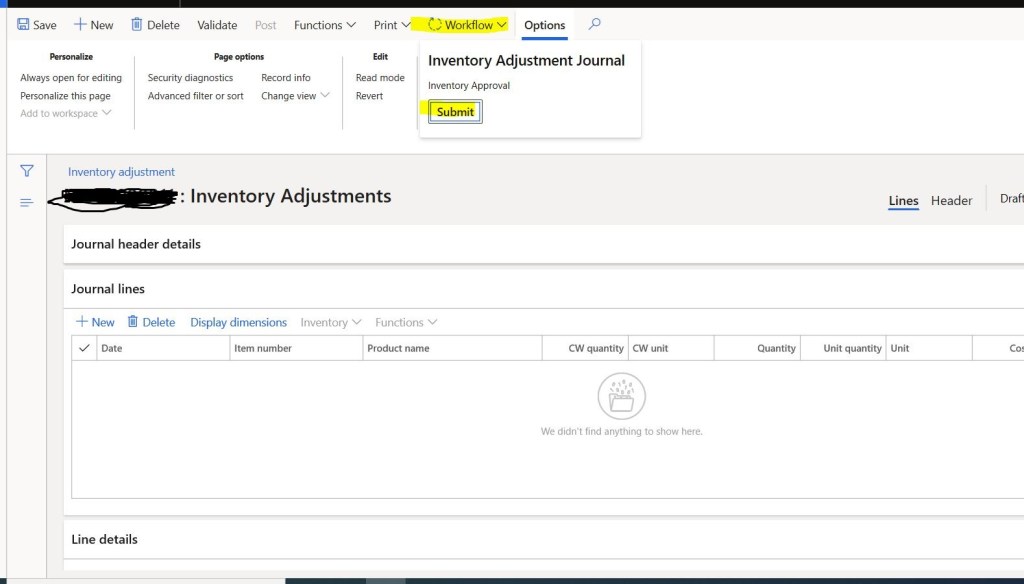
That’s it for inventory workflow.
2. Using Unit of measure and unit quantity
This is another good feature added by Microsoft, earlier all inventory journals had the restriction that whatever quantity you enter it will be considered in “Inventory UOM” only and also there was no visibility for the user to see the “Inventory UOM” for that either we need to customize or need to go to product master and see.
Now, by having Unit quantity and unit of measurement at line level, we need not worry about anything. Now we can add inventory in any UOM where system will automatically convert the Given UOM and quantity in Inventory UOM based on defined conversion.
Example:
Let’s say: Item-1 is having inventory UOM- Each, and we want to post inventory journal in “Box”.
Conversion: 1 Box = 6 Each
Earlier it was not possible to put inventory in Box, we had to know the conversion outside and then convert in inventory UOM then add the inventory. But now its not require you can add the inventory in any UOM, only thing is you need to have the conversion.
In this case: Unit of measurement you can add: 1-Box, Unit Quantity – 1, After posting system will automatically post as 6-Each in inventory.

So, its very important feature, utilize this.
3. Enable to Update same GST transaction Id for both shipment and receive-India GST (Stock Transfer)
This feature is related to “Stock Transfer” for India localization, earlier when we use to post the “Interstate” stock transfer, system use to generate the different “GST Transaction Id” for shipment and “Receipt” which you to create the confusion or reconciliation issue in GST matching. Now you can have same ID for the both which will help us to identify and link both shipment and receipt.
That’s it for this blog, please read and share with your network. I will be back with my next blog of GST series.
Thank You!!!
Thank You Nikesh Kurhade for helping in writing this blog !!!
 Explore Microsoft Dynamics 365 Finance and Operations Together
Will this feature be compatible with counting journals created by warehouse scanners?
LikeLike
This should work because it triggers based on Journal name setup…may be you can create one and test.
Sorry for late response.
LikeLike