Hello DAX champions, welcome to my next blog. This blog is sort but very important for any one who wants to capture financials by inventory site.
We all know Microsoft Dynamics has got a very important feature called as “Financial Dimensions” which no other ERP has got. This helps us to capture financial transactions at different levels which can be considered as “KPI’s” for organization performance, also of course it helps us to optimize the chart of accounts.
Now, we can add financial dimensions to our accounting structure but it also brings up the challenge of capturing defined financial dimensions for every transaction. So, to make this easy for users we should have some mechanism to auto capture the required dimensions based on nature of transaction and “Dimension Link” is one the feature.
So, now let’s understand this with one use case.
Use case: Customer has different Business units across different locations and those business units are also “Inventory “locations. Now, customer’s requirement is to capture the Business unit for each and every transaction as financial dimension for all inventory transactions.
Solution Approach: Now to solve this Dynamics 365 has got a very important feature where we can link both sites and business units’ financial dimension together and wherever site will be selected automatically corresponding “Business Unit” will be captured as financial dimension in transaction. This will avoid any manual selection of financial dimensions and also will bring control from end user point of view.
Now, let’s see how we can achieve this:
Step-1: Create operating unit of type Business Unit
Organization administration > Organization > Operation Unit > New > Select Type “Business Unit”

Step-2: Create Financial dimension as “Business Unit”
General Ledger > Chart of account > Dimensions > Financial Dimension > Create New > Type Business Unit

Step-3: Add to the accounting Structure
General Ledger > Chart of account > Accounting Structure > Edit > Add segment
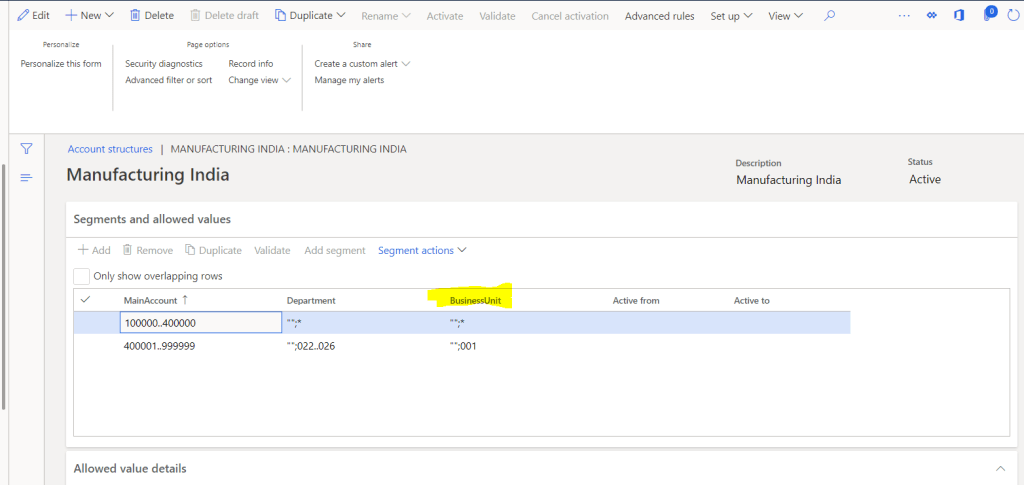
Step-4: Create Inventory Location Site
Inventory Management > Setup > Inventory breakdown > Site > New
Note: There is not financial dimension tab

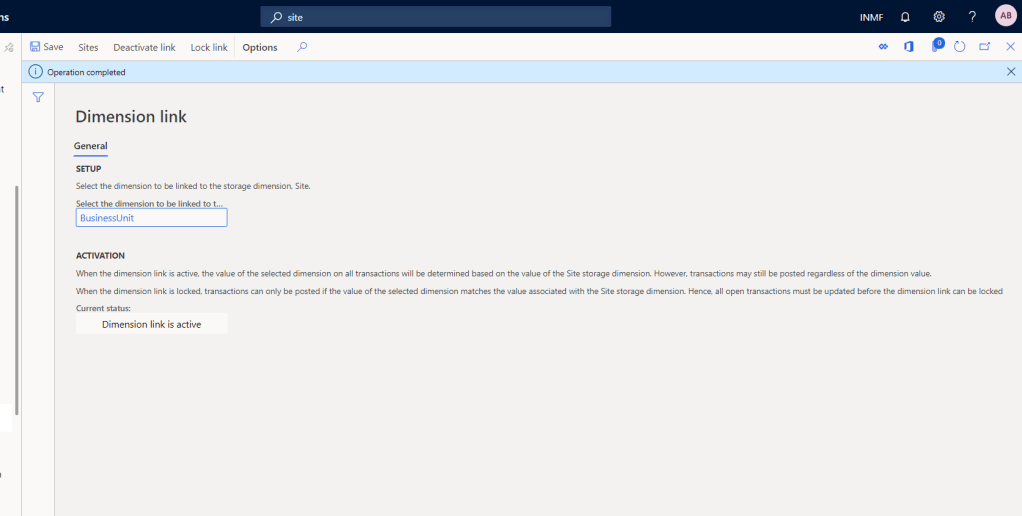
Step-5: Link dimension to Dimension Link
Inventory Management > Setup > Posting > Dimension Link > Select Business unit or dimension which you want to link with inventory site
Note: You will see only financial dimension in dropdown which you will add to accounting structure.


Step-6: Click on Sites

Step-7: Mapp dimension to site which you want to select with site
Note: Now you will be able to see financial dimension tab on site master

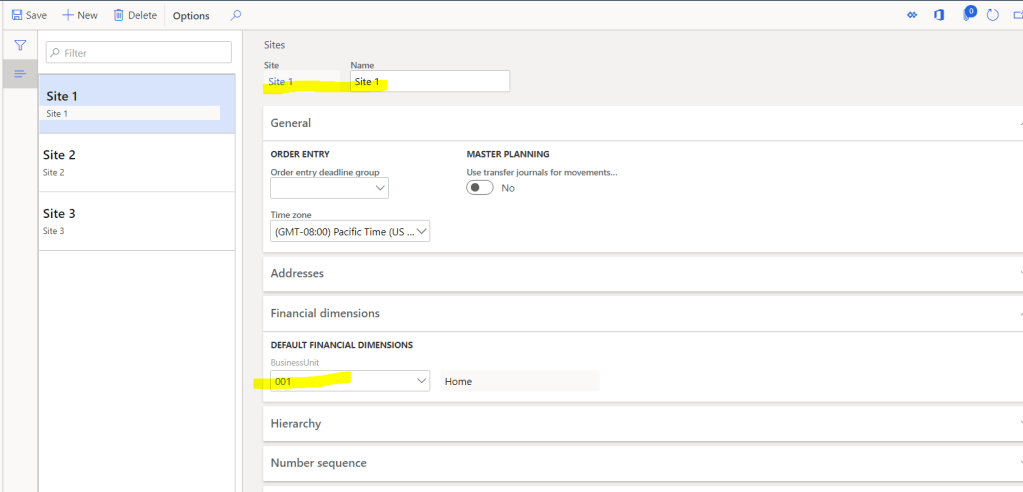
Step-8: Activate the dimension link
Now, Let’s see one example:
Create one PO with site-1, after creating financial dimensions “Business” should be selected automatically for the purchase order.


Now you can see Business unit got selected automatically on-site selection.
That’s it for this blog. Keep reading and sharing with your friends.
I will be back soon with my next blog; Next few blogs will be for the suggestion which I have received from some of you.
Thank You !!!
 Explore Microsoft Dynamics 365 Finance and Operations Together
I have maintained two financial dimensions A&B as mandatory dimensions, & Financial dimension “A” is mapped in dimension link. While “Ending” the production order system is not able to identify the fiancial dimnension “B” and gives the following error
***Production: P000337
Voucher PCV-14192
You must select a value in the B field in combination with the following dimensions values that are valid:
MainAccount 140100.
A X.
Dimension values were validated with this account structure: Manufacturing B/S
Ledger account validated using 140100-X-, Record Id: 68719755530
Reported from company accounts usmf
You must select a value in the B field in combination with the following dimensions values that are valid:****
How should I handle this situation, is there any provision available in F&O to handle this ?
LikeLike
You can define that financial dimensions at production order
LikeLike
Hi Saurabh, nice article. I enjoyed reading it.
Do you have any tips for drawing/defaulting this, based on any more-specific Inventory Dimensions? For example, Warehouse. Might it be possible to have financial dimensions appear on Sales Order Lines, based on the Warehouse from which the goods were picked? From the Zone would be even more ideal.
As far as I can tell, there is no way to do something similar to Dimension Link that affects anything more specific than Site. Vexing, for my situation 🙂
Kind Regards
LikeLike
That’s right Edison, currently it’s a site level only
LikeLike