Advance payment are very common business activity in any customer business for both vendor and customer but when we implement ERP to the organization the main ask from finance department is how they can tag advances paid to purchase/sales order.
So, in this blog we will talk about different ways of advance payments in D365. Here are possible scenario’s which we will be talking:
- Vendor Advance
- Against Purchase order
- Direct Advance without Purchase order
- Customer Advance
- Against Sales Order
- Direct Advance without Sales order
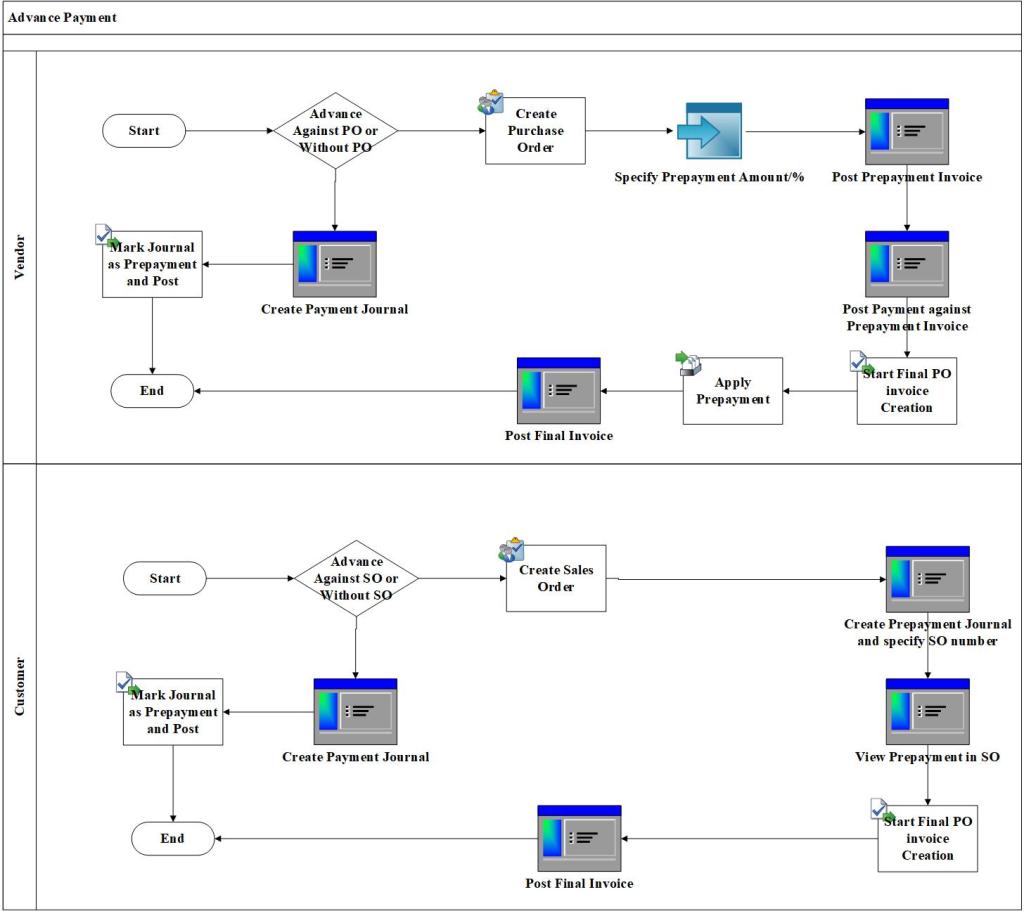
Scenario-1: Against Purchase order
Pre-Requisites: Map posting profile for prepayment

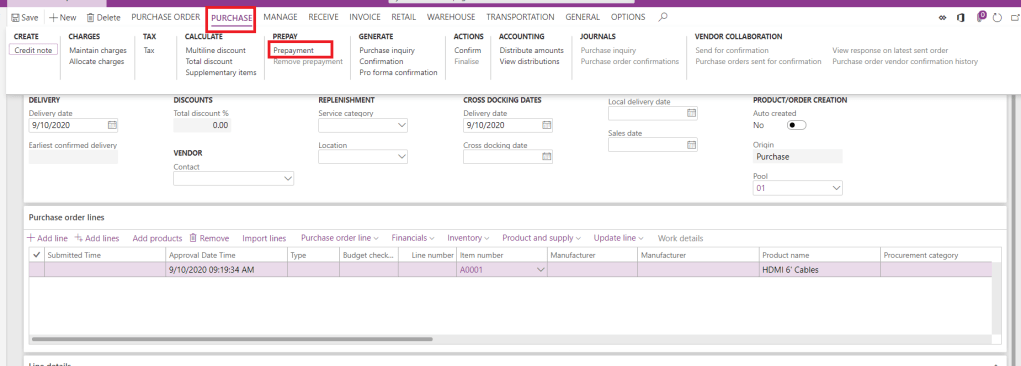
Step-1: Create PO and Specify Prepayment Amount/Percentage
Navigate to, All Purchase orders > New > Add all information > Purchase tab > Prepayment button > Enter Prepayment information > Save > Confirm PO

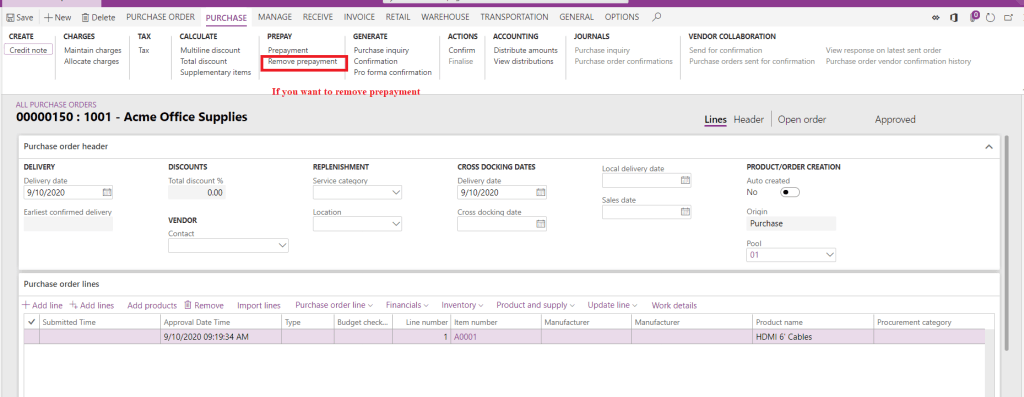
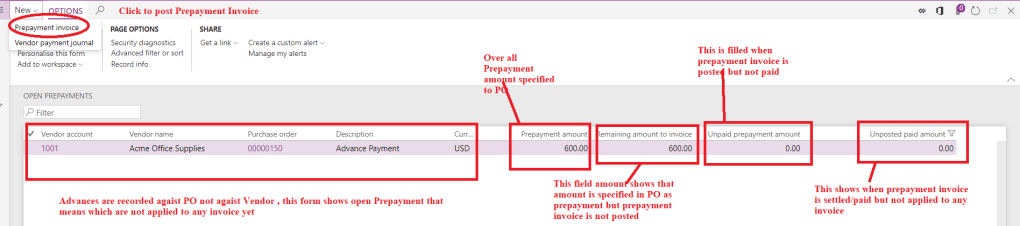
Step-2: View Open Prepayment Status and Post Prepayment Invoice
Navigate to, Accounts Payable > Purchase orders > Open Prepayments > Click New > Prepayment Invoice > Specify Information > Post

Step-3: Post Payment against Prepayment Invoice
Navigate to, Accounts Payable > Purchase orders > Open Prepayments > Click New > Payment Journal > Select Prepayment Invoice > Post


Step-4: Post Final Invoice and Apply Prepayment to Invoice
Navigate to, Accounts Payable > Purchase orders > Select Purchase order > Invoice > Enter Invoice information > vendor invoice Apply Prepayment > Select and Apply Prepayment > Post
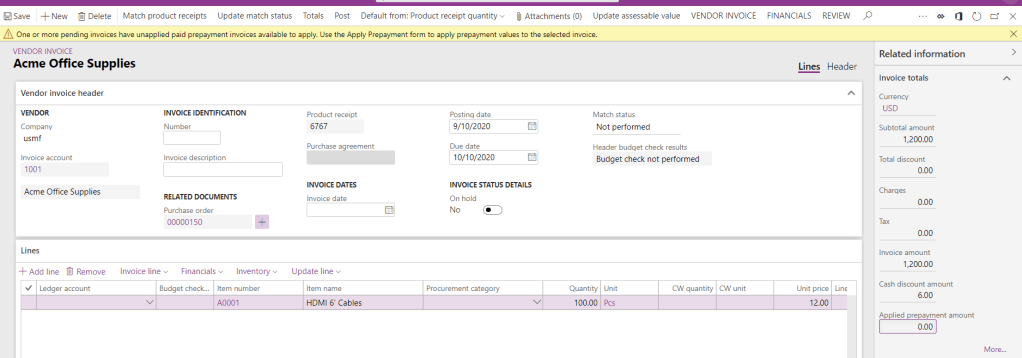
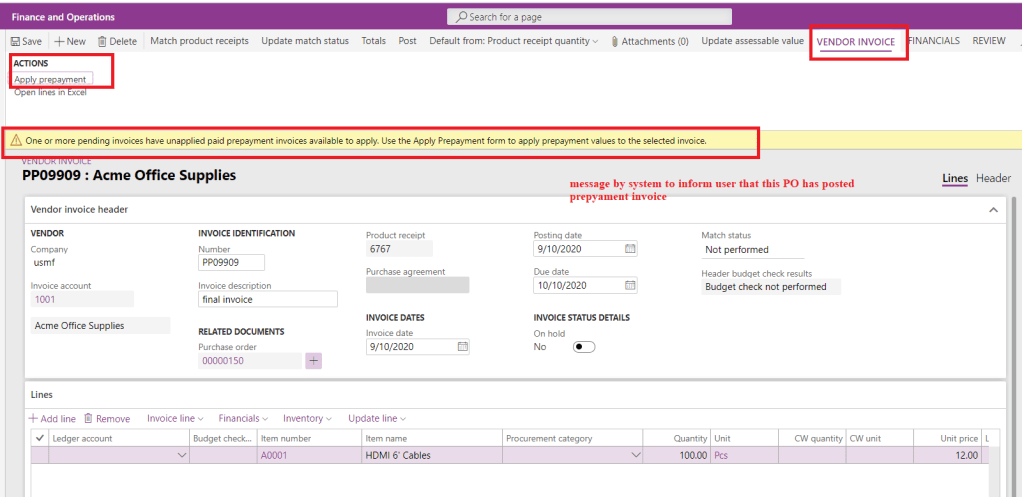

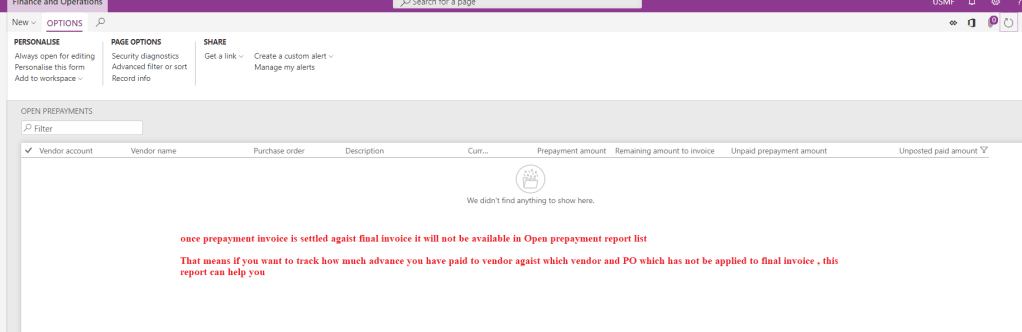
Note-1: In this method prepayments are recorded against “Purchase order” and will not reflect in Vendor subledger report. That means if user wants to view advance payments as “Debit” in vendor transactions as open , he/she will not find because if you observe accounting entry in this process , advances are recorded in separate ledger as specified in Posting profile and Vendor balance is Zero after payment journal.
Note-2: So, if customer wants to tag “Advances “against purchase order they should keep separate track of advances using “Open Prepayments” report not with Vendor ledger/transaction report
Scenario-2: Direct Advance without Purchase order
Pre-requisites: Map Prepayment posting profile in AP parameters

Create Payment Journal and Mark prepayment
Navigate to, Accounts Payable > Payments > Vendor payment Journal > Create Payment Journal > Lines > Enter vendor, amount, bank etc..> Mark Prepayment > Post
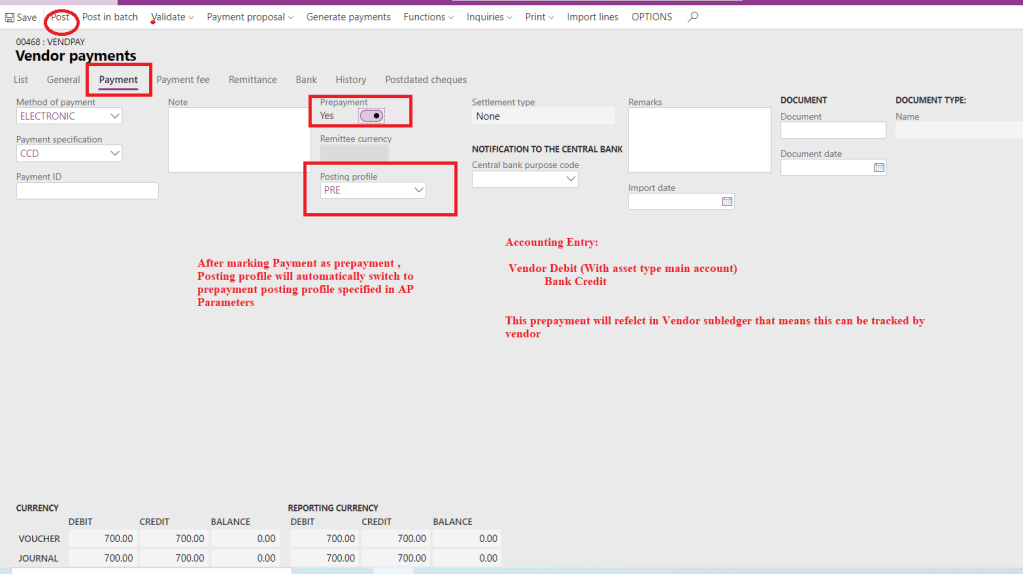
Note: In this method Advances will be reflecting in vendor balance but this will not have any reference to Purchase order
Scenario-3: Against Sales order
Pre-requisites: Map Prepayment posting profile in AR parameters
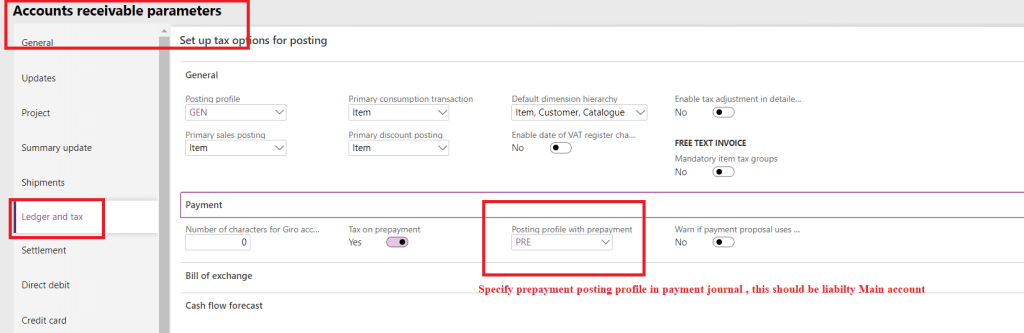
Unlike vendor prepayment, customer does not have extensive prepayment feature, but one can tag Sales order in advance payment.
Step-1: Create Sales order and Copy SO number
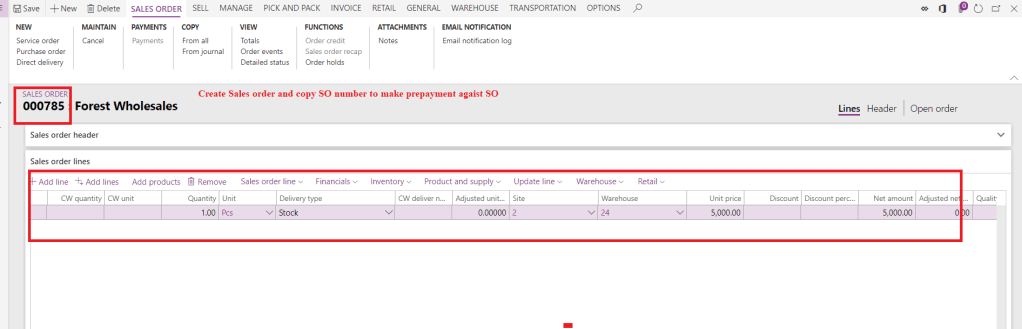
Step-2: Create Payment Journal and Mark prepayment
Navigate, Accounts receivable > Payment > Customer Payment > Create New > Lines

Step-3: Enter SO number as Payment reference > Post
This is very important step to tag Sales order in payment journal as prepayment.

Step-4: view Prepayment information in Sales order
Navigate to, Accounts Receivable > Orders > Sales order > Sell Tab > Prepayment
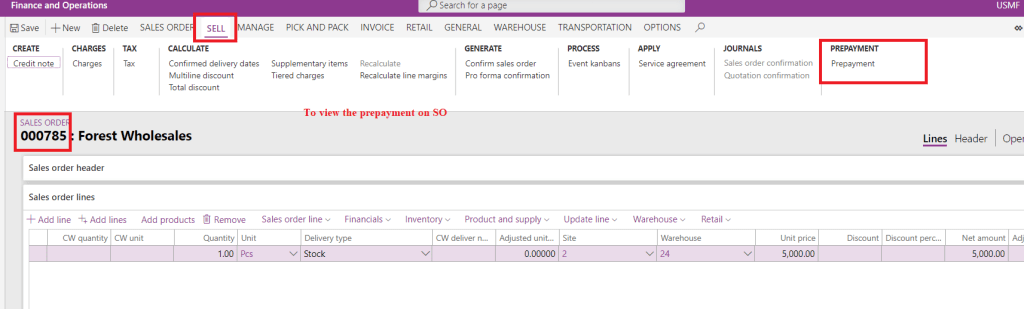
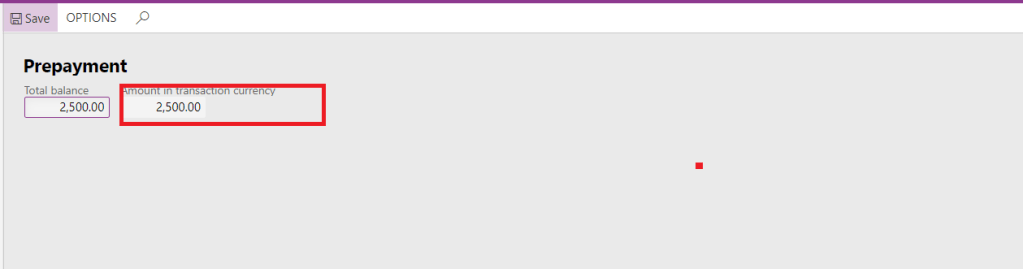
Step-5: Post SO invoice and view balance

Note-1: In this process user can view advances received from customer in customer subledger report.
Note-2: User must enter SO number manually
Scenario-4: Direct Advance without Sales order
In this process, process will be same as above Scenario-3 , follow step-2 and post payment journal without specifying Payment reference as SO number.
That is it for this blog, hope this will help you to define the advance payments for customer.
Thank You!!! Keep reading and sharing!!!
 Explore Microsoft Dynamics 365 Finance and Operations Together
Hi Saurabh,
Nice article…
I tried all the steps but the Step 5 in Scenario-3: Against Sales order, i didn’t get the same mean the advance amount is settle with the invoice and balance showing the remaining receivables. Can you please tell me what can be the reason.
Thanks,
Imran
LikeLike
Hi, before posting invoice, there is a button in invoice tab in action pane named as settle open transaction, in that mark the advance payment and then post invoice
LikeLike
HI Saurabh, I am testing your description of prepayment on a sales order. But if I go to the sales order…the options in Sell Prepayment stays “grey”as in not active.
I have tried this –> This is very important step to tag Sales order in payment journal as prepayment.
by filling in payment reference ( but there is no link or selection behind…it is only text) so I don’t have the feeling that this wil work
by insert column “Sales order” and select sales order
What do I miss or forget?
LikeLike
Yes, it’s a text field you just need to enter the sales order number here
LikeLike
Hi Bharti
Please explain more in prepayment cancelation, if the PO is fully invoiced and Prepayment is some balance
let Say,
In the PO Value is 75 units cost of 1000 = 75000; In this there are 50% advance payment and each invoice value we need to deduct 50% of Invoice value
there are 4 delivery happen each Invoice will have 15 qty and cost 15000 and prepayment (Net 15000 – 7500 = 7500) is payable;
After several months the last schedule is not delivered and the delivery remainder was cancelled then PO status changed to Invoice.
Now the supplier is issued the CN for Advance payment : 7500
Question is : How to cancel this 7500 in the Purchase order?
LikeLike
Hi Kumar, prepayment will not work like this, your 50% prepayment which 37500 . It will be automatically applied o first three invoices, 15000, 15000 and 7500 . Because prepayment does not get applied proportionately. System try to allocate completely whenever new invoice is recorded
LikeLike
Dear Bharti
This is possible to apply manual input in the apply prepayment form.
My main question is how to cancel the unsettled balance which is 7500, because the supplier given the CN document which is valid in taxation
Regards
On Wed, 3 Aug 2022, 18:09 Explore Microsoft Dynamics 365 Finance and Operations Together, comment-reply@wordpress.com wrote:
LikeLike
Hi Bharti
Please explain more in prepayment cancelation, if the PO is fully invoiced and Prepayment is some balance
let Say,
In the PO Value is 75 units cost of 1000 = 75000; In this there are 50% advance payment and each invoice value we need to deduct 50% of Invoice value
there are 4 delivery happen each Invoice will have 15 qty and cost 15000 and prepayment (Net 15000 – 7500 = 7500) is payable;
After several months the last schedule is not delivered and the delivery remainder was cancelled then PO status changed to Invoice.
Now the supplier is issued the CN for Advance payment : 7500
Question is : How to cancel this 7500 in the Purchase order?
LikeLike
Hi saurabh,
It looks like prepayment option is deprecated by design and no longer available.
LikeLike
Do you mean PO prepayment? I don’t think so
LikeLike
i guess the SO Prepayment option is deprecated, because i can’t get the “Prepayment” button activated on the sales orders after following the steps mentioned in the scenario 3
LikeLike
Not sure if that’s true. Need to check wave plan
LikeLike
This feature is deprecated from 10.0.14 !!
We cant add a prepayment anymore in SO
LikeLike